About this PowerPoint template
Free Google Slides themes and PowerPoint templates
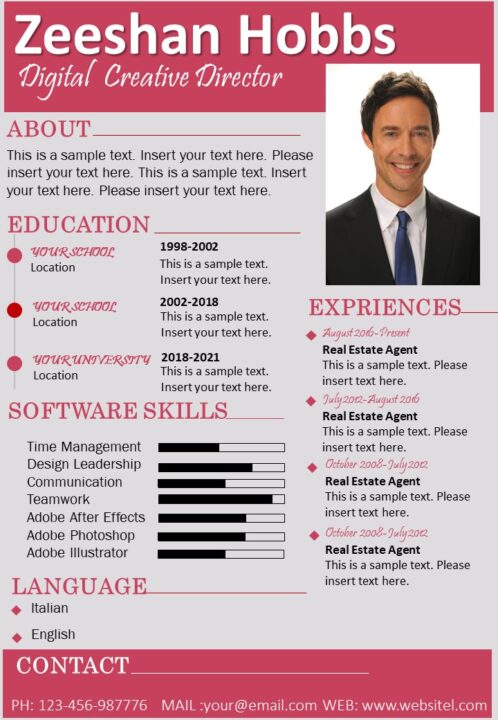
Introducing the Professional Senior Digital Creative Director Two Page Resume in PowerPoint PPT. This fully editable PPT template is designed for creative professionals who want to showcase their skills, experience, and portfolio in a visually appealing and professional manner. Whether you are a seasoned creative director or a senior digital creative, this template will help you stand out from the crowd and make a lasting impression on potential employers.
The two-page resume template is easy to customize and comes with a comprehensive set of instructions to help you get started. You can change the colors, fonts, and images to match your personal brand, and add your own text to highlight your achievements and skills. The template is also fully compatible with PowerPoint, so you can easily edit and update your resume as your career progresses.
The Professional Senior Digital Creative Director Two Page Resume in PowerPoint PPT is designed to showcase your portfolio and highlight your experience in a visually engaging way. The template features a sleek and modern design, with a focus on showcasing your work and achievements. The first page of the template features a summary section, where you can introduce yourself and highlight your key skills and experience. The second page is dedicated to showcasing your portfolio, with space for you to add images and descriptions of your work.
The template also includes a section for your education and qualifications, as well as a skills section where you can list your technical and creative skills. The template is fully editable, so you can add, remove, or change any section to suit your needs.
In conclusion, the Professional Senior Digital Creative Director Two Page Resume in PowerPoint PPT is a must-have for creative professionals who want to showcase their skills and experience in a visually appealing and professional manner. With its sleek and modern design, comprehensive instructions, and fully editable features, this template is the perfect tool to help you stand out from the crowd and make a lasting impression on potential employers. Get your hands on this template today and take the first step towards securing your dream job!
- Completely editable in terms of shape, color, size and text
- This template has a built in color theme which is unaffected by copy-pasting
- Includes an icon family with 135 unique completely editable icons
- Drag and drop image placeholder
- Completely editable (using spreadsheet) data-driven charts for displaying statistics
- Completely editable vector graphics
Supports
Microsoft PowerPoint 2010, 2011, 2013, 2016
MacOffice 2016, MacOffice 365, Keynote, Google Slides
Template details
| Template | Professional Senior Digital Creative Director Two Page Resume |
|---|---|
| Category | Resume Templates |
| File format | PowerPoint (.pptx) |
| Page size | A4 portrait (210 × 297 mm) |
| Preview images | 2 |
| Editable | Yes: text, colours, shapes, icons and charts |
| Works with | PowerPoint 2010 and later, PowerPoint for Mac, Google Slides |
| Licence | Royalty-free, yours to keep using after your plan ends (terms of use apply) |
| Price | Included in every SlideVilla plan |
| Added | 14 Jul 2020 |
| Last updated | 31 Jan 2023 |
Questions about this template
Can I edit the Professional Senior Digital Creative Director Two Page Resume?
Yes. Every part of the Professional Senior Digital Creative Director Two Page Resume is made with native PowerPoint shapes and text boxes, so you can change the wording, colours, fonts and sizes, move or delete elements, and swap icons without losing quality.
Does the Professional Senior Digital Creative Director Two Page Resume work in Google Slides?
Yes. Download the .pptx file, upload it to Google Drive and open it with Google Slides. The layout, shapes and text stay editable there too.
Is the Professional Senior Digital Creative Director Two Page Resume free?
It is a premium template, included in every SlideVilla plan together with the rest of the library. See plans and pricing.
What size and format is it?
It is a PPTX file in A4 portrait (210 × 297 mm) format, with 2 preview images shown above.
How to use this template
- Step 1DownloadClick Download and the .pptx file saves straight to your computer.
- Step 2OpenOpen it in PowerPoint, or upload it to Google Slides from your Drive.
- Step 3Make it yoursChange text, colours, icons and charts. Every element is fully editable.
Categories
Related PowerPoint templates
More designs like this one, ready to edit.